We updated sync to be easier! The purpose of our sync is to help users match the stream with the game they are watching.
Our old “Sync” had a toggle to set the period of the event and a time section that had to be entered manually.
The two biggest complaints were:
- It was a lot of manual clicking/typing
- It was challenging to sync a static timestamp with a dynamic game clock on your TV (sync only works when set on a running clock)
The new experience makes both simpler.
For Creators
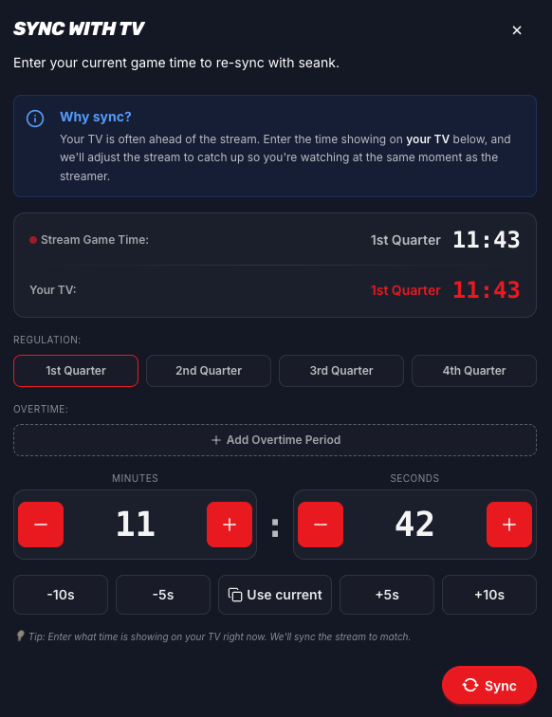
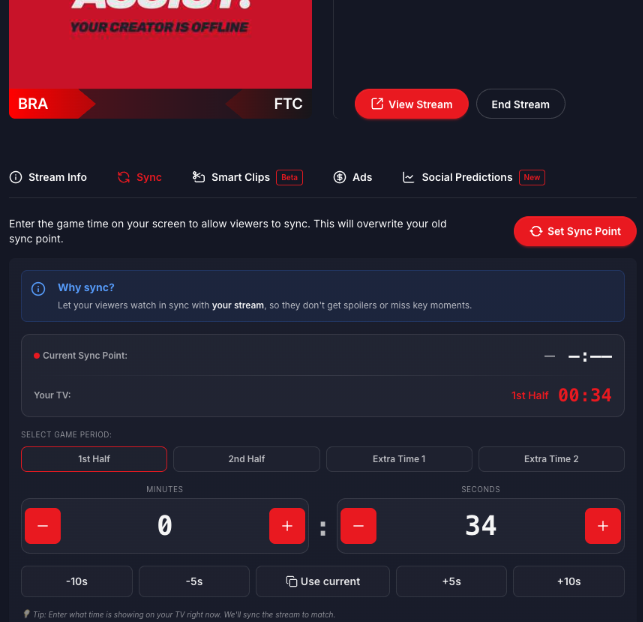
In the new version, the creator is trying to match the “Current Sync Point” (the game time of their stream) with “Your TV” (the scoreboard of the actual game they are watching on their home TV).
Creators can modify “Your TV” time by using the buttons in the bottom half of the screen. Once it matches the actual TV, Set Sync Point establishes the new anchor point for the stream and we automate the scoreboard for the rest of the game.
All of the timestamps in the picture are running clocks so it is easier to match the dynamic scoreboard on your TV using the ”+” and ”-” buttons.
NOTE: Getting sync perfect to the second is what makes your clips and highlights work properly.
For Viewers
The viewer is trying to match the “Stream Game Time” (the creator’s scoreboard) with “Your TV” (the scoreboard of the actual game they are watching on their home TV).
In setting the “Stream Game Time,” viewers can modify “Your TV” time by using the buttons in the bottom half of the screen.
Once manipulated to match their actual TV, the Sync button jumps them to the part of the creator’s stream that aligns with their TV for the rest of the game.
All of the timestamps in the picture are running clocks so it is easier to match the dynamic scoreboard on your TV using the ”+” and ”-” buttons.